Somewhere past $10M in revenue, most consumer brands hit the same wall. Nothing breaks loudly. There's no outage, no emergency. Things just get slower.
Someone asks where the launch plan lives and gets three different answers. The retail team is emailing a spreadsheet back and forth, and nobody's sure which version is current. The marketing plan for the year sits in a file on one person's laptop. A buyer asks about stock for a new flavor, and two people go hunting for the same answer in two different places.
You didn't get sloppy, you got bigger. The way you worked at 15 people quietly stopped working at 60.
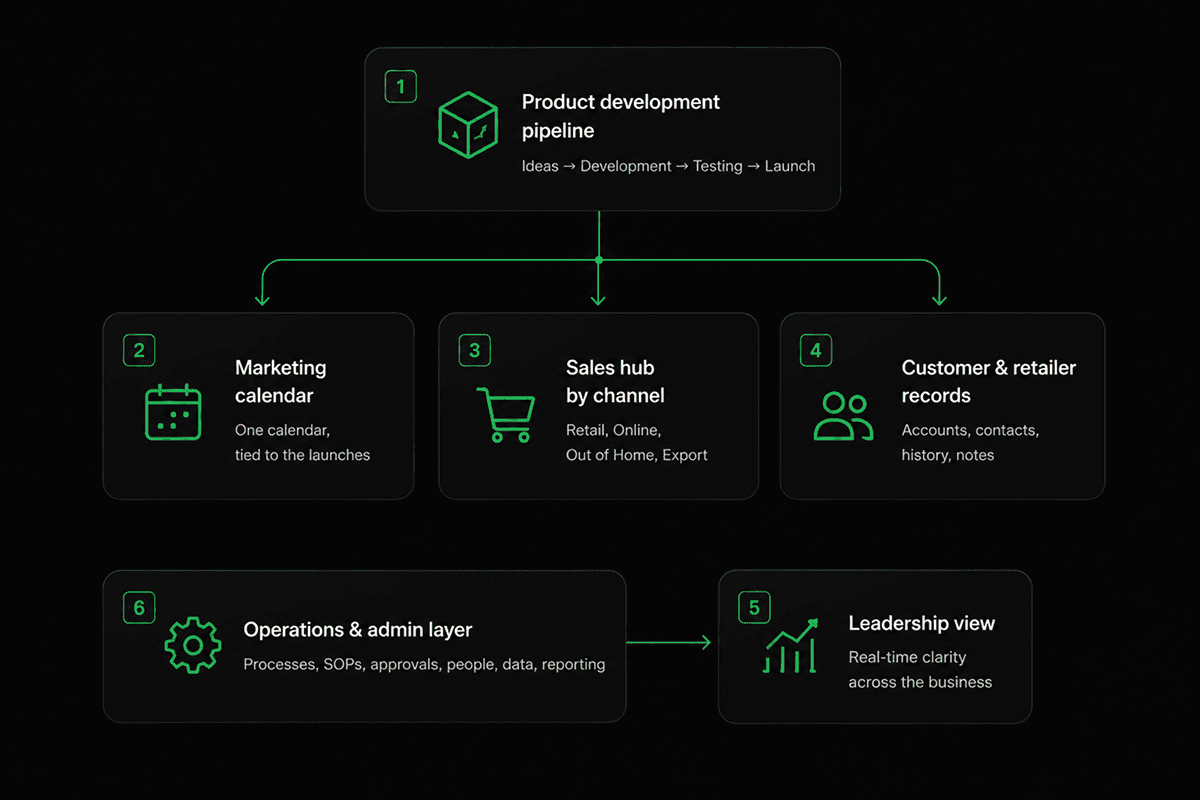
This is a guide to what to build instead, written specifically for brands selling physical products across more than one channel. Six systems, roughly in the order we build them, plus the three mistakes that sink a rollout before it starts.
Why $10M hits consumer brands harder than most businesses
A software company that doubles in size mostly adds people. A consumer brand that doubles in size adds channels.
By the time you're past $10M, you're probably selling through some combination of:
Your own online store
Retail (supermarkets, chains, independents)
Food service and out of home (cafés, gyms, offices)
Export and international markets
Marketplaces
Each of those has its own rhythm, its own buyers, and its own calendar. Retail runs on range reviews months in advance. Your online store runs on a promo calendar measured in weeks, or even days. Export runs on shipping timelines and paperwork.
On top of that, you're making a physical thing. Product development runs on months to years, not week-long sprints. There are factories, samples, packaging, compliance, and a launch date that everyone else's work is quietly hanging off. There's the seasonal peak that eats a third of the year, plus the collaboration with agencies and freelancers who need to see just enough and no more of your company's knowledge to get their work done.
So you don't really have one company with six departments. You have five small businesses sharing a logo, a bank account, and a chat app.
Most brands respond to this by buying tools. A tool for the sales pipeline, a tool for customer support, a project tool marketing likes, a shared drive for everything else. Each one holds a piece of the truth. Nobody holds all of it. And the person who does hold most of it is usually a founder or an operations lead who's now a full-time human search engine, the glue that keeps the business running.
The fix isn't yet another tool. It's picking one place where work lives, and building (nearly) everything else in it. Start with these six specific things.
The six systems
1. A product development pipeline everyone can see
What it looks like when it's broken: the new product exists in a spreadsheet the product team owns. Marketing finds out the launch moved when someone mentions it in passing. Sales has already told a buyer the old date. Product updates in Slack get buried under tens of threads.
What to build: one place where every product in development sits as a record, with its stage, its owner, its target launch date, and its samples and specs attached. Then connect it to the work it creates. When a product moves from concept to sampling, the tasks that need to happen in operations, marketing, and sales are linked to that same record.
What good looks like: a launch date moves, and everyone downstream can learn it. Nobody has to send a message, anyone can reference the source of truth for this information on their own.
2. One marketing calendar, tied to the launches
What it looks like when it's broken: an annual plan in a spreadsheet, a content calendar somewhere else, and a promo calendar that lives mostly in one person's head. Three sources, and none of them are in sync.
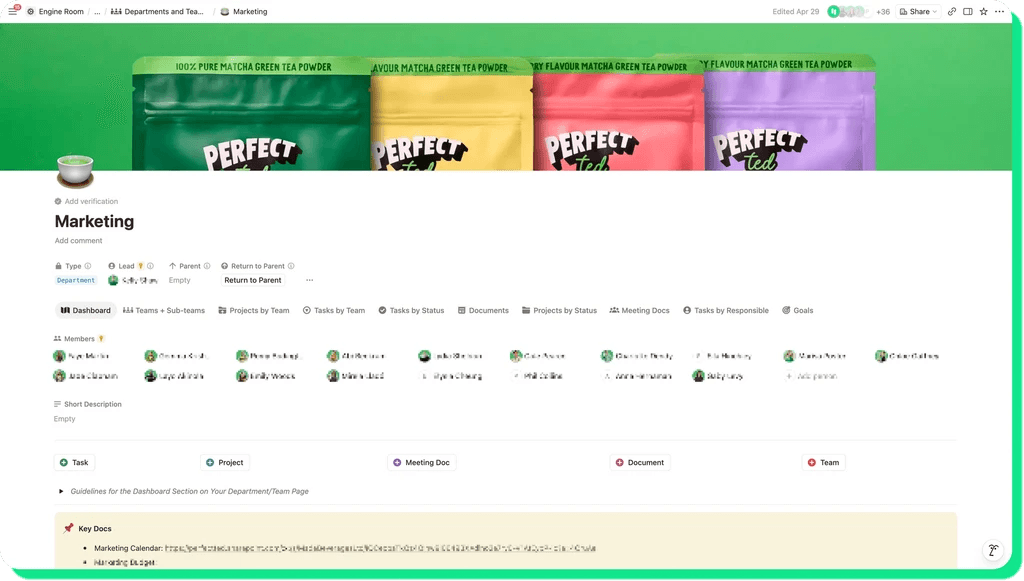
What to build: a single database with calendar view, covering campaigns, content, and promotions, where each item links back to the product and the channel it supports. Include specific filtered views for the parts of marketing that work differently, such as brand, campaigns, content, events, so the calendar stays readable instead of becoming one long list.
What good looks like: you open one view and see what's going out this month, who's making it, and which launch it's tied to. When a launch date shifts, the content that depends on it shifts too.
3. A sales hub split by channel, not one generic, busy board
This is the one most brands get wrong, and it's the most specific to how you actually sell.
What it looks like when it's broken: everyone shares one pipeline, so the retail account manager scrolls past export deals to find their own work. Or worse, sales never adopted the shared workspace at all and runs entirely on email and various personal spreadsheets.
What to build: separate filtered boards per channel (e.g. retail, out of home, export, online), each showing only the fields, stages, and views that channel actually needs. A retail listing and a café account are not the same shape of deal, and pretending they are is why nobody keeps the pipeline updated.
What good looks like: each account manager has a home that fits their job, and leadership can still see all of them in one central view.
4. Customer and retailer records in the same place as the work
What it looks like when it's broken: you pay for a separate customer relationship tool, most of the team doesn't even have access to it because seats are so expensive, and the notes that matter end up in email threads anyway.
What to build: contacts, companies, deals, and activity history as records in the same workspace as your projects and tasks, so a buyer conversation links directly to the launch it's about.
This is the boldest thing on the list, so here's the honest version: for a lot of brands past $10m, a dedicated sales tool is genuinely worth it. But plenty of others are paying for one that only two people use, while the actual decisions get made somewhere else. If that's you, moving those records into where everyone else works usually wins, not because the tool was bad, but because adoption follows the work. This is exactly what we did for PerfectTed. More on that below.
What good looks like: one fewer subscription, and account history that people actually update because it's already open in front of them.
5. A leadership view that doesn't require chasing anyone
What it looks like when it's broken: a weekly ritual where three people compile updates for a meeting, using information that was already out of date when they collected it.
What to build: a dashboard with linked views showing the status from every department's own work, not a separate report anyone has to write. If the teams are updating their projects, leadership already has the answer in real time.
What good looks like: the founder checks the status of a launch on a Monday morning without messaging anybody.
6. The operations and admin layer
What it looks like when it's broken: the same questions land in chat every week. How do I book leave? What's the process for a new supplier? Where's the current brand kit? Who approves this?
What to build: one home for the boring, essential stuff, such as policies, processes, hiring and onboarding, office and equipment requests, and brand assets. It's not glamorous, and it's usually the section that buys back the most hours, although it's not one directly tied to revenue.
What good looks like: new hires get productive in days instead of weeks, and your operations lead stops being a help desk and can focus on more important, high-leverage work.
What this looked like at PerfectTed
PerfectTed is the world's largest matcha brand. Founded in 2021 and based in London, it has around 100 people, product in 30,000+ stores across 50+ countries, and a Dragons' Den investment behind it.
When they came to us, they had most of the problems above at once. Assets lived across four different storage platforms with no clear source of truth. Information traveled by email and chat, so cross-department visibility was effectively zero. Marketing's annual plan sat in a spreadsheet outside the workspace. The sales team had never logged in to Notion at all. Operations was tracking work through email and physical notebooks.
They'd worked with a freelance consultant before, and the build they got unfortunately didn't survive the company adding departments and headcount as it scaled.
We opened with a design sprint. We interviewed department heads across the business to map how they actually worked and where things broke. That produced a scope document: 12 recommendations ready to implement immediately, and 10 more worth exploring.
Over the following seven months we shipped 17+ projects. Structural work first: cleaning up duplicate databases, setting real permissions with private spaces for finance and leadership, and reorganizing navigation. Then department hubs one at a time: marketing, sales, finance, product development, leadership, operations, and business operations. Then the connected databases underneath them, including a full replacement for their customer relationship tool, with every active deal, contact, and organization migrated across.
Where it landed:
The separate customer relationship tool was retired entirely, and the sales team adopted the replacement
Operations moved from physical notebooks to managing projects and handoffs in one place
Sales was onboarded properly for the first time
Anyone can now check status across departments without chasing an update
A new global markets department slots into the same structure as the company expands internationally
"It's been such a valuable process for us, and the workspace is in a really strong place now, which is a huge credit to you. I know it's going to make a big difference to how we operate day-to-day. Also just really appreciate how you worked with everyone, you made it feel easy, practical and actually usable, which isn't always the case with these things!"
Marisa Poster, Co-Founder at PerfectTed
The full story is in our PerfectTed case study.
Three ways this goes wrong
Building the six systems above isn't the only hard part of centralizing your operations. We've watched rollouts stall and fail for reasons that had nothing to do with what got built:
1. Leadership doesn't use it themselves
This is the big one. If the founders and department heads keep running their own decisions out of a private spreadsheet, everyone notices. Teams take their cues from what leadership actually does, not from what leadership announced.
You don't need executives living in the workspace all day. You need them checking the leadership view instead of asking for an update, and answering questions with a link to Notion instead of a spreadsheet screenshot. That's usually enough to tip the rest of the company.
2. You're trying to fix every workflow at once
The instinct is to map the whole company and build it all in one go. It never works. The build takes months, nobody sees value until the end, and by the time you launch, half of what you designed is already out of date, and teams are no longer excited for the change.
Instead, go one team at a time: pick the department in the most pain, build their hub properly, get them using it, then move on to the team they work with the most. Each rollout gets easier, partly because you've learned something and partly because the last team is now telling the next one it was worth it. As more teams get onboarded, their collaboration gets better and your efforts compound.
3. There are no champions spread across teams
A workspace with no internal owners decays. Not dramatically, but rather slowly, as people create pages in the wrong place and nobody corrects it until things are so hard to find that people start using other tools altogether.
The fix is picking one person per department who's genuinely into organization, giving them proper training, and making it an actual part of their role rather than a favor or extra responsibility they don't have the time for. They answer the small questions, keep the structure tidy, and spot what needs to change as the team's work changes. Champions are what makes the difference between a workspace that's still good in a year and one that quietly turns back into a folder graveyard, as they help users on a daily basis.
Where to start
You don't need to commit to all six systems on day one. A realistic first 90 days:
Audit what you have. What lives where, who actually uses it, and what you're paying for that nobody opens.
Pick the loudest pain. One department, usually the one where information is most stuck. Often operations or sales. Marketing is usually the hardest, so we often prefer to start with a team they collaborate with closely and then move on to Marketing second.
Build that hub properly and roll it out with real training. Not a link drop and a hopeful message.
Name the champion for that team before you move on, and empower them.
Then take the next department!
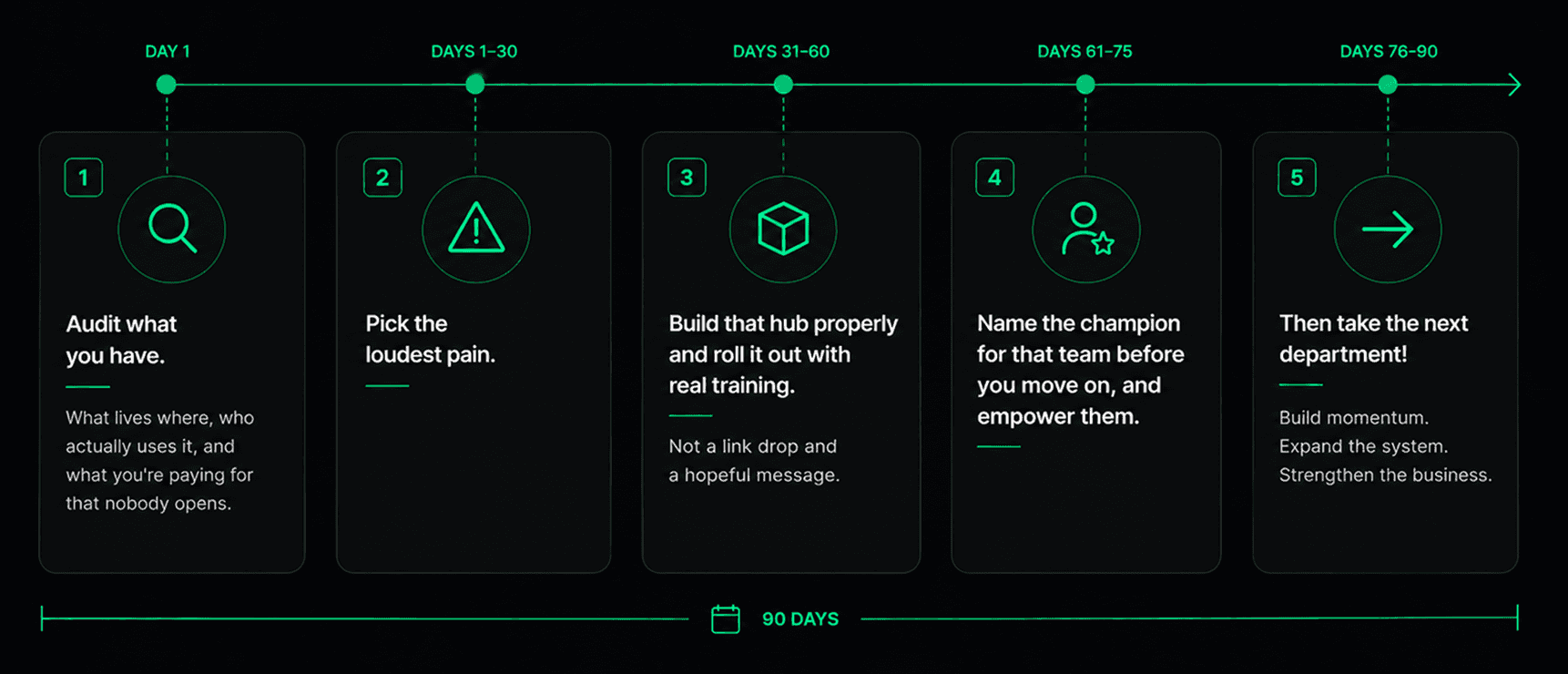
The whole playbook is here: the six systems, the order to build them, and the mistakes to avoid. Plenty of teams take it from exactly this point and run with it.
If you'd rather not spend the next six months working out the sequence for your own brand, that's the part we're good at.
Say hi and we'll help you figure out where to start.